AI 自动开发日志系统
Mu Online
4 大平台生态开发日志
状态:在线
|
4 大平台:已激活
|
安全:AES-256
|
延迟:12ms
|
AI 核心:激活
自动开发日志系统,记录奇迹MU客户端在全 4 大平台(PC、Android、iOS 及 Web 网页端)各版本的优化进度、性能提升、界面改进及稳定性增强。
0
更新天数
0
更新项目总数
0
修复问题数
0
功能与改进
October 18, 2026
v12.5
Officially launched and deployed the Web Client (HTML5 / WebGL) game version. The MU Online ecosystem is now fully complete with 4 synchronized active platforms: PC, Android, iOS, and Web Browser, allowing players to jump straight into the game inside any modern browser without installation.
PLAY ON WEB: https://mu-spk-web.pages.dev/
Full Support: Chrome, Edge, Safari, Firefox & Mobile Browsers
Synchronized regular and bold font rendering on Android to closely match the PC EX700 client appearance.
Added Oswald regular and bold fonts with independent selection when rendering game text.
Updated HP, Mana, Shield (SD), and Stamina (AG) bar numbers to centered text formatting.

Mirrored new fonts and centered character gauge status formatting from Android to iOS.
Bundled font asset files and open-source license documentation across respective client builds.
Optimized memory allocation and startup sequence on iOS to mitigate crash risks during game launch.
Streamlined patch downloading, integrity verification, and post-download asset hot-replacement.
Implemented automatic retry handling for failed update downloads, preventing launches with incomplete data.
Guarded against duplicate game engine initialization, proceeding only once app view surface is fully ready.
Updated in-game client version string display for iOS.
Added legacy UI button invocation compatibility bridges on iOS to eliminate symbol linking errors.
October 17, 2026
v12.5
Completed Master Skill descriptions and corrected language mismatches in Chinese skill headers.
Shortened Thai title strings to resolve game initialization crashes with Thai locale data.
Redesigned map header, coordinates banner, and MiniMap frame on Android matching EX700 UI.
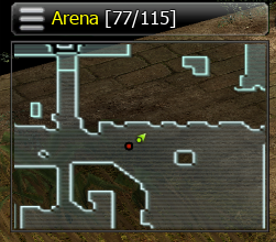
Streamlined MiniMap overlay footprint while preserving all map marker indicators.
Upgraded MuHelper settings, start, and pause buttons; synchronized textures, active states, and touch areas.
Temporarily hid legacy shortcut buttons in preparation for layout restructuring.
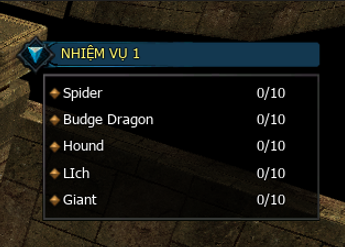
Mirrored compact quest panel from EX700 to Android, maintaining hover effects and drag-to-reposition support.
Synchronized new MuHelper bar, MiniMap, quest panel, and potion buttons from Android to iOS.
Added matching UI texture and sprite assets for the iOS client build.
Synchronized duplicate-login notification popup across Android, EX700, and iOS clients.
Corrected graphic textures, display dimensions, and OK buttons on message boxes for EX700 and iOS.
Fixed EXP bar on Android and iOS to render correctly immediately upon login or character switch.
Added Roboto font support with dynamic font switching and font size adjustments on Android and iOS.
Synchronized regular/bold fonts and font data; resolved linker errors when adding new font assets.
October 16, 2026
v12.5
Synchronized login video background from EX700 to legacy PC, falling back to static background if video is unsupported.
Tuned login background opacity and removed redundant video logging overhead.
Fixed server-side connection close handling, preventing double-freeing sessions and revalidating session state before teardown.
Clarified connection tracking telemetry to distinguish unauthenticated sessions from active in-game players.
Added duplicate-login notification popup and redirected user back to login screen on legacy PC.
Suppressed auto-reconnect loops when session termination is caused by duplicate login.
Realigned notice text bounds and fixed confirmation button states after alt-tabbing or window focus shifts.
Completed and enhanced translations for UI labels, global announcements, and NPC names.
Translated buff effect tooltips, quest descriptions, NPC dialogs, server lists, and tutorial guides.
Added localization for socket options, harmony options, item tooltips, and skill names.
October 15, 2026
v12.5
Mirrored text background and overhead label line spacing to the legacy PC client.
Realigined content layout and button labels in the Delgado dialog.
Reorganized MuHelper, moving delay conditions, item counts, and related settings to dedicated configuration tabs.
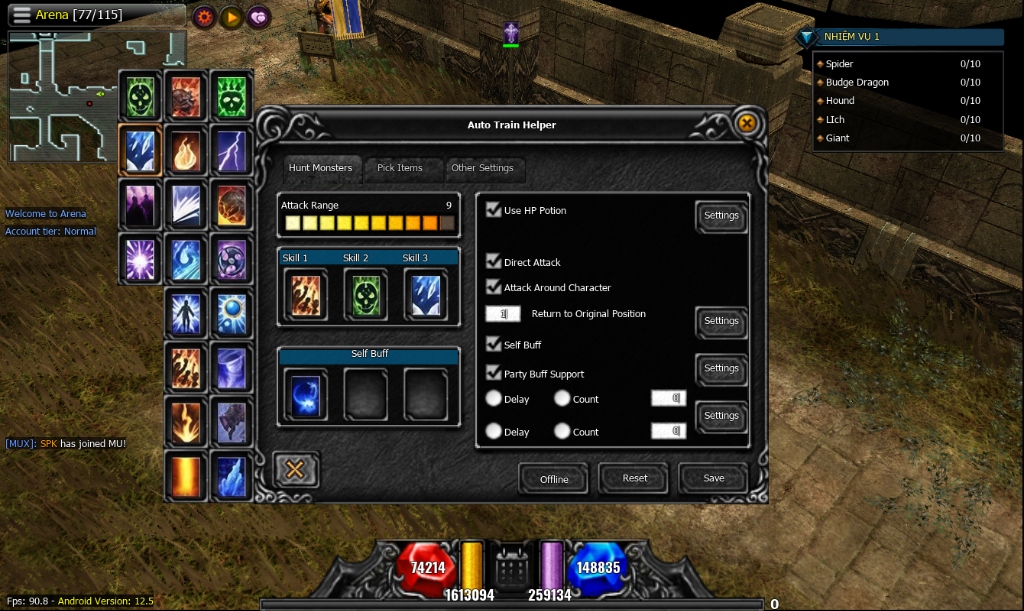
Synchronized visual display coordinates, touch hitboxes, and input controls after MuHelper rearrangement.
Redesigned Auto Combo layout, preserving default Dark Knight mechanics while adding expandable options for other classes.
Fixed close button labels and centered text across jewel combination and disassembly dialogs.
Updated title bar and background styling for the minimized quest panel on EX700.
Compacted quest objectives to fit the new background while preserving hover effects.
October 14, 2026
v12.5
Centered button text labels in the legacy PC Elpis dialog.
Restored system notices on EX700, displaying across chat tabs and refreshing immediately upon arrival.
Adjusted text background bounds on EX700 to prevent bottom edge clipping.
Synchronized character name, title, guild, and chat bubble spacing based on font line height.
October 13, 2026
v12.4
Corrected overlapping textbox text and improved caret placement.
Updated reset behavior for pickup and attack ranges and cleared additional pickup entries.
Updated the default return-to-position interval while keeping it editable.
Synchronized MuHelper improvements with the iOS client.
Improved circular-option selection consistency and adjusted item-count input placement.
Improved textbox font rendering in the regular PC client while preserving typing and password behavior.
Reduced redundant rendering passes for characters, NPCs, and out-of-view effects.
Updated chat input background on EX700 and added display size adjustability.
Limited overly long chat content to prevent issues when typing, pasting, and sending messages.
Streamlined standard, party, and guild chat UI; synchronized filters and transmission channels.
Aligned text, button dimensions, and touch hitboxes for chat tabs.
Removed unused dark backdrop, control buttons, and expand toggles from chat frame.
Removed unnecessary automated performance tracking logging.
October 12, 2026
v12.4
Ported and upgraded MuHelper on Android while preserving Offline Mode and the existing interface style.
Improved automatic combo sequencing to follow completed skill actions and character attack speed.
Corrected checkbox states and exclusive selection behavior for circular options.
Improved reset behavior and cleared unwanted selections.
Fixed a crash when adding items to the additional pickup list.
Centered the helper and settings windows and improved control spacing and text alignment.
October 11, 2026
v12.4
Continued refining the EX700 & LEGEND - BLUE client interface.
October 10, 2026
v12.4
Continued work on the EX700 & LEGEND - BLUE client interface.
October 09, 2026
v12.4
Worked on the EX700 & LEGEND - BLUE client interface.
October 08, 2026
v12.4
Started work on the EX700 & LEGEND - BLUE client interface.
October 07, 2026
v12.3
Optimized saved login accounts list, rebalanced controls, and centered server title.
Upgraded login action buttons to a modern style and fixed an issue related to extra vault storage.
Fine-tuned mobile font display sizing to make text cleaner and better proportioned.
Added security code field to account registration with updated verification handling.
Rebalanced registration form fields and buttons with updated guide notices.
Fixed checkbox display states for various options in system settings.
Corrected chat text layout to prevent abnormal line breaks when displaying colored messages.
Revamped Master Skill Tree window interface with an improved close button.
Fixed dark artifact around the close button in the Master Skill Tree window.
Enhanced font loading system and finalized the in-game typography.
Upgraded visual presentation of Master skill slots and skill icons for sharper display.
Optimized Master skill point allocation, allowing multi-point leveling smoothly without lag.
Improved server-side skill point calculation to ensure strict requirements and instant updates.
Refined quick maximum point allocation and activation for special skills.
Completed system synchronization between client application and game server.
October 06, 2026
v12.3
Refreshed the system settings window with centered titles and a clean close button.
Enhanced pet vitality bar rendering to display remaining life smoothly and accurately.
Aligned multiple companion vitality panels neatly in a vertical column.
Prevented accidental movement taps while inspecting item details.
Streamlined test deployment configurations for mobile simulation environments.
Fixed helper toggle button so tapping it again closes the configuration window.
Centered category tabs in settings with balanced dividers.
Improved the login remember-password checkbox and persistence handling.
Upgraded native login screen background scaling across various screen aspects.
October 05, 2026
v12.3
Polished password input dialogs and trade confirmation controls.
Modernized jewel quantity boxes with improved spacing and custom styling.
Standardized background styling and close controls across game windows.
Applied new visual themes to Ranking and Event Time interfaces.
Revamped interface themes for Rebirth, Titles, Lucky Wheel, Class Change, and Extended Shop.
Applied matching interface styling to Military Rank and Cultivation features.
Refreshed visuals for major event windows and equipment refinement systems.
Redesigned character deletion confirmation with balanced proportions.
Hardened memory cleanup procedures to prevent data conflicts.
Synchronized interface designs for Main Menu and Assistant Helper.
Streamlined the hero shortcut bar to maximize available screen view.
Realigned the MiniMap neatly beneath the hero shortcut bar.
Added styled backgrounds and padding to MiniMap tooltips to prevent text overflow.
Repositioned system announcements and combat notices to eliminate overlap.
Aligned the chat log and input bar closer to the bottom screen edge.
Centered buff icons and arranged pet vitality bars to avoid map overlap.
October 04, 2026
v12.3
Reordered character quick-action shortcut bar for better reliability.
Unified visual styling for auto-combat and auto-recovery toggle buttons.
Upgraded in-game shop background visuals with high-definition artwork.
Redesigned dialog backgrounds to maintain sharp proportions without stretching.
Applied modern text-styled buttons and centered message text for enhanced readability.
Externalized button labels to allow seamless language switching.
Modernized buttons across character selection and server selection screens.
Corrected displaced interface buttons and resolved build issues.
Replaced segmented menu backgrounds with cohesive, polished artwork.
Adapted menu contents dynamically depending on the active screen.
October 03, 2026
v12.3
Ensured experience bars initialize and display immediately upon logging in.
Aligned skill hotkey slots and improved touch hitboxes for responsiveness.
Fixed hotkey page switching to ensure all assigned skill slots appear properly.
Assigned quick-use slots for recovery potions at convenient on-screen positions.
Adjusted interface depth so main bars remain underneath open popup windows.
Streamlined Master Skill Tree activation, automatically closing other windows.
Updated confirmation button scaling on message dialogs for clearer visibility.
October 02, 2026
v12.3
Fixed item tooltip layering to ensure information appears above bottom interface bars.
Centered option tab labels inside the auto-combat helper interface.
Upgraded button rendering to maintain crisp visual quality without distortion.
Improved asset slicing precision for high-resolution user interface elements.
Refined inventory frame border joins and standardized reusable window containers.
Differentiated inventory title headers from other feature window headers.
Enhanced support for high-resolution background assets, preventing unexpected crashes.
Adjusted tab sizing within the Jewel Bank window for better balance.
Reorganized personal shop buttons into a clean, easy-to-reach layout.
Smoothed transition animations for opening and closing the main interface bar.
Aligned shield gauge visuals and status values on the main HUD.
October 01, 2026
v12.3
Improved system font clarity, aligned text baselines, and optimized on-screen text layout.
Rearranged options in system settings for a cleaner, well-balanced, and intuitive layout.
Expanded camera elevation and zoom limits, providing a wider field of view.
Fixed display issues for character names, guild titles, and shop signs to prevent truncation.
Added soft text outline effects to ensure clear readability across all backgrounds.
Minimized initial installer size with automated resource streaming on game launch.
Enhanced data integrity verification with automatic resumption after network interruptions.
Optimized game asset compression to save storage space and speed up installation.
Refreshed the download progress display with a clean, easy-to-read status overlay.
Upgraded high-speed content delivery infrastructure for mobile clients.
Automated update packaging and synchronization across the distribution network.
Synchronized text dimensions and outline effects across different client platforms.
Enhanced multilingual typing and message display support in the chat system.
Added a reconnect retry action during downloads for quick recovery from connection drops.
Synchronized input box and tooltip measurements across international releases.
Refined the language selection menu to match specific regional releases.
September 30, 2026
v12.3
Restored touch-and-hold scrollbar dragging in the map selection window by recognizing it as an open UI, preventing its touch input from entering the world tap-to-move and character long-press paths.
Added a Hide Cursor checkbox below Voice Chat in the first General Settings tab. Checking it hides the mouse cursor; unchecking it displays the cursor immediately. The option defaults to hidden and is saved for the next game launch.
Unified and reordered the skill enumeration definitions and synchronized the Android skill list with the main client.
Improved multilingual chat-name handling and converted Android chat rendering to RenderText while preserving message colors.
Prevented inline HTML color tags from being split between chat lines and displayed as literal markup.
Disabled accidental taps on the chat filter toolbar and restored the All Messages view when the chat input opens.
September 29, 2026
Added a shared GameServer exception for the Lorencia arena (Map 0, X 139-148, Y 123-132): when both players are inside this area, each kill increments PKCount without increasing PKLevel.
Restored the murderer restriction in the move-map window on the main PC, Android, and iOS clients. Characters with PKLevel 5 or higher cannot select a destination, and all destination requirement columns are displayed in red.
Documented the Android and iOS AutoUpdate URL configuration locations, the iOS manifest URL, HTTP domain permissions, and the files to change when moving to a new update host.
September 28, 2026
Corrected MuHelper recognition of active Master-skill buffs for Dark Knight, Dark Wizard, Elf, Summoner, and Rage Fighter to prevent repeated unnecessary casting. Added missing Greater Life Mastered and Mana Shield Mastered buff selections, preserved the existing Dark Lord handling, and synchronized the main PC, Android, and iOS clients.
September 27, 2026
Prevented world tap-to-move inside the expanded main-menu panel and its toggle button. Selecting a menu button no longer queues unintended movement, even when the menu closes in the same frame; normal movement remains available outside the menu controls.
Updated shared GameServer PK/AutoCtrl handling so toggling the mode no longer displays a fake murderer PKLevel. The character keeps the current PKLevel while retaining the PK indicator and automatic Ctrl behavior.
September 26, 2026
Prevented world tap-to-move while the Command window is open so confirming Trade and other character commands cannot move the player accidentally.
Added long-press character interaction so holding a character for approximately one second opens the Quick Command menu without first enabling the tap-command toggle.
Added a Voice Chat option that disables microphone transmission, hides the Android microphone button, and blocks incoming voice playback when turned off.
Corrected Android microphone hold-to-talk handling so recorded voice is transmitted while the microphone control is held.
Fixed Android password-change validation incorrectly rejecting passwords that already satisfy the minimum character requirement.
Hid the six mobile skill controls while the Doppelganger NPC interface is open, matching their existing inventory-window behavior.
Updated duplicate-login disconnection handling so Android displays the Lost Connection notice instead of closing unexpectedly, and the OK button exits the application correctly.
Externalized the General Settings tab, Voice Chat, and language names into TextHtml configuration files with translations for every supported client language.
September 25, 2026
Redesigned the Android General Settings window into four compact tabs for Effect, Sound, Language, and Camera options.
Rebalanced the settings-window dimensions and control positions for widescreen mobile displays.
Corrected the Sound, Music, Effect Item, and Font Size controls so their graphics and value labels remain aligned inside the window.
Replaced the Camera Up/Down, Camera 360, and Zoom plus/minus buttons with horizontal drag controls.
Rebuilt the camera slider tracks from the original scrollbar artwork and corrected one-pixel seams and handle-edge artifacts.
Kept unsupported runtime resolution switching hidden on Android and moved the camera controls into the fourth tab.
Corrected the login panel, saved-account list, delete buttons, and Save Password checkbox positioning across different widescreen resolutions.
September 24, 2026
Enlarged the Android character-selection Create, Menu, Connect, and Delete buttons for easier use on physical phones.
Enlarged the character-creation controls, arranged all seven class buttons as one vertical column on the right, and aligned the enlarged OK and Cancel buttons vertically beside the character panel.
Enlarged the login-screen Menu and Credit buttons while keeping their original corner positions.
Increased the Server and Sub-server selection controls to 140% of their original size, including their occupancy gauges and touch areas.
Moved the skill-control tap-to-move exclusion zone flush against the widescreen right edge and disabled its temporary red debug overlay.
Applied the same character-selection, character-creation, server-selection, and tap-move exclusion updates to the alternate Android Rash client.
Synchronized the finalized mobile button layouts and right-edge tap-move exclusion zone with the iOS client.
September 23, 2026
Preserved the original two-step item interaction inside inventory, storage, trade, and other item windows while keeping one-tap movement on the game world.
Prevented item placement between Storage Inventory and My Inventory from closing the window or issuing an unintended character movement command.
Restored drag control for the Sound, Music, and MuHelper option sliders after enabling one-tap movement.
Added a MuHelper option that automatically accepts incoming party invitations while automatic training is active.
Added automatic Guild membership approval for Guild Masters and hid the option from characters without Guild Master authority.
Synchronized the automatic party and Guild acceptance options with the Android and iOS clients.
September 22, 2026
Changed Android tap-to-move to execute movement on the first tap instead of requiring one tap to position the cursor and a second tap to confirm movement.
Corrected physical-device touch coordinate conversion so the selected world destination matches the actual screen position on different resolutions and aspect ratios.
Preserved the normal ground-click effect while hiding the desktop mouse cursor from the Android game screen.
Added a movement-only exclusion zone over the mobile skill controls so touching skill buttons does not move the character while the buttons remain fully interactive.
Kept joystick movement independent from the new tap-to-move path and preserved normal movement outside the skill-control area.
September 21, 2026
Enabled tap-to-move on Android alongside the existing movement joystick so players can use either control method without disabling the other.
Applied the same combined joystick and tap-to-move behavior to the iOS client.
Added the extended and mastered Dark Lord Critical Damage skills to the MuHelper automatic buff list.
Registered every Dark Lord Critical Damage skill level under the same active buff state so MuHelper casts it once and waits for the buff to expire instead of casting continuously.
Synchronized the Dark Lord automatic buff correction with the iOS client.
Assigned randomized PC, Android, and iOS platform identities to FakeOnline characters so their platform icons are displayed consistently with real players.
September 20, 2026
Corrected duplicate-account login handling so enabling DisconnectOnlineAccount removes the older active session when the same account logs in again.
Prevented the disconnected older client from immediately entering the automatic reconnect loop and repeatedly taking the account back from the new session.
Updated the New message-button artwork to match the existing OK and Cancel button style, including the text color, outline, size, and weight.
September 19, 2026
Fixed a client crash while loading and evaluating item set-option information.
September 18, 2026
Added platform identification for PC, Android, and iOS clients so each character can display the correct device icon in game.
Added the complete in-game account registration flow from the client through the game and account services.
Added localized registration labels, validation notices, and result messages for every supported language.
Fixed mobile registration textbox scaling so entered text remains aligned inside all input fields on different screen sizes.
Fixed unsafe registration input copying that could corrupt valid usernames, passwords, or email addresses during validation.
Changed the protected client-configuration binary layout, grouped fields by data type, and added reserved leading space to invalidate older fixed-offset modifications.
Added the connection-configuration checksum to the generator report alongside the existing client and protected-data checksums.
September 16, 2026
Enabled the MuHelper Auto Combo option for every character class instead of restricting it to Dark Knight.
Reorganized the MuHelper option layout to prevent the Auto Combo control from overlapping class-specific options.
Repositioned the Reset and Save buttons to match the expanded MuHelper layout.
Synchronized the MuHelper checkbox, button layout, and circular skill-slot presentation with the iOS client.
Moved the Blood Castle, Devil Square, and Chaos Castle event timers to the top edge of the game screen at Y = 5.
Applied the same event-timer position to the iOS client.
September 15, 2026
Updated the Android combat skill controls to use circular skill icons matching their joystick slots.
Corrected the upside-down skill textures so every icon is displayed in its proper orientation.
Changed the drawing order so skill icons are rendered above their slot frames and remain clear instead of appearing dark beneath the overlay.
September 14, 2026
Corrected Android hardware volume-key handling so the game media stream can reach a true mute state at level zero.
Preserved normal gradual volume adjustment above zero without affecting the separate VoiceChat audio path.
September 11, 2026
Reorganized all Android world and map-object resources under one dedicated map directory to keep the packaged client data clean and manageable.
Updated every static and dynamically generated map-resource path to use the new directory layout.
Preserved Android asset path normalization and writable update-data precedence with the new map structure.
Verified that no legacy world or map-object directories or source paths remain at the Android asset root.
Successfully rebuilt the complete Android debug package after reorganizing all map resources.
September 10, 2026
Corrected the Android sound and music controls so setting either volume to zero fully mutes that audio channel, while higher values increase smoothly from a low audible level.
Improved the Android update screen with clearer white outlined status text and a taller progress bar.
Fixed the severe water-rendering corruption on Land of Trials that produced flashing vertical surfaces instead of the normal animated water.
Kept the water correction isolated from unrelated map objects, monsters, effects, and interface rendering.
September 07, 2026
Replaced the Android bootstrap loading artwork with the new higher-resolution version and removed the duplicate bundled image.
Fixed the Crossbow skill on Android firing visually without dealing damage by preserving the correct skill data through the projectile attack path.
Applied the same Crossbow damage correction to the iOS client.
August 31, 2026
Updated the Raklion boss event so participants return to Gate 17 after rewards and the configured post-boss delay.
Killing the boss now starts the evacuation countdown immediately instead of waiting for the remaining battle timeout.
Characters that log out inside the Raklion boss map are relocated to Gate 17 when they log in again.
August 30, 2026
Updated the Android application icon, including the standard and round launcher icons.
Fixed manual reset incorrectly applying saved automatic stat distribution; automatic allocation now runs only when auto-reset is enabled.
August 29, 2026
Applied the event-panel updates to Android and iOS.
Refreshed monster information when a new event begins without requiring players to close and reopen the panel.
Prevented newly started events from being incorrectly marked as exhausted while waiting for updated monster information.
Restored the next event countdown after an event ends so exhausted events do not remain permanently red.
Used event-transition updates and a single start refresh instead of continuously requesting event data while the panel is open.
August 28, 2026
Updated event monster-count handling to refresh the remaining monsters when opening the event panel.
Marked active events with no remaining monsters in red, cleared their activity display to --/--, and disabled their move action.
August 27, 2026
Updated the iOS automatic combo behavior to match the Android changes.
Synchronized mobile configuration capacity with the configuration generator to support the expanded set of interface buttons.
August 26, 2026
Corrected pickup notification naming to use the item confirmed by the server instead of stale information from an earlier manual pickup.
August 25, 2026
Refined automatic combo progression to advance after an actual skill attack rather than a fixed delay, keeping the three-skill sequence aligned with character attack speed.
Fixed automatic combat stopping after the first completed combo so the helper can continue its attack cycles until stopped.
August 24, 2026
Fixed automatic item pickup for special event drops that use level-dependent names and non-standard visual models.
Corrected item-level decoding before matching dropped-item names against the MuHelper custom pickup list.
Fixed automatic pickup notifications showing the wrong item name instead of the item actually collected.
Synchronized automatic pickup requests with the normal pending-item state to prevent overlapping requests and stale item information.
August 23, 2026
Increased the safe chat-message capacity for longer Thai and other multibyte-language messages.
Added UTF-8-safe message truncation so text exceeding the supported chat limit is cut cleanly without producing corrupted characters.
Synchronized client and server chat limits to prevent long multilingual messages from reverting to invalid text or the sender name.
August 22, 2026
Fixed missing ground-item names for special event consumables whose visual models are stored outside the regular item-model range.
Added safe validation for supported event-item models while preserving the crash protection for invalid ground objects.
Corrected level-based event-item name resolution so Firecracker, Heart of Love, and related drops display their proper names.
2026年08月21日
修复Android端MuHelper自动连招排序:确保配置的三个技能按照技能1→2→3的正确顺序执行。
防止高攻击速度与持续自动攻击状态导致同一连招技能在前进前被重复触发多次。
在当前目标丢失或切换时干净地重置连招序列,确保每次新的攻击循环都从第一个技能开始。
保持原始技能执行和封包路径不变,确保连招修复不影响手动攻击、其他技能或网络行为。
2026年08月20日
在IDE选择了与现有Gradle版本不兼容的Java运行时后,恢复了Android Studio项目同步。
将项目设置为使用兼容的Java运行时,使正常的应用运行配置和Gradle任务重新可用。
在不进行不必要的项目工具链升级的情况下,保留了现有Android构建变体和原生源码配置。
2026年08月19日
改进了对多语言长文本道具属性的验证,防止中文数据产生损坏的提示字符串和不安全读取。
在对解码文本应用更安全的长度和终止处理的同时,保留了380装备和强化属性的显示。
在生成器端结构变更后审查Android配置兼容性,防止不匹配的数据进入模型加载流程。
2026年08月18日
验证打包的连接数据及其校验和,以区分损坏的更新数据与不相关的运行时崩溃。
审查了Android在线更新器对连接和主配置包的路径,确保下载的替换文件从可写更新位置解析。
修正更新文件优先级检查,防止较旧的打包配置静默覆盖成功下载的替换文件。
保持更新失败处理为非阻塞,在远程文件不可用时游戏可继续使用打包数据。
2026年08月17日
调查了由扩展外部生成的客户端配置数据引入的启动崩溃,并识别了生成器与Android客户端之间的二进制布局不匹配问题。
在实验性加密许可证列表加载器在游戏初始化期间被证明不安全后,恢复了稳定的受保护数据验证流程。
修正外部菜单按钮数据对齐,确保每个按钮状态保持有效的启用或禁用值,而不是读取溢出数据。
在移除不稳定初始化更改的同时,保留了与现有打包客户端配置的兼容性。
2026年08月16日
修复功能被禁用后触碰任意NPC均显示提示的问题,现仅在触碰该功能对应NPC时才显示。
修复炼化功能中相同的问题:禁用时提示被错误广播至所有NPC,而非仅该功能专属NPC。
修复服务端在接收到无效封包时发生严重崩溃并意外宕机的问题。
修复逻辑错误导致损坏封包未被检测到,服务端将继续处理无效数据而非丢弃。
2026年08月15日
修复个人商店中一个严重漏洞:玩家可利用低速网络同时发送多个购买请求,绕过余额检查,以不足的金币购买道具。
在服务端为每位买家新增独立事务锁,无论同时收到多少封包,每位买家同一时刻仅允许处理一笔购买请求。
新增服务端购买冷却时间,防止玩家在短时间内连续大量发送购买请求。
修复多笔游戏货币购买请求同时通过余额检查的问题,现在处理开始前即锁定交易状态,防止排队请求同时绕过检查。
在玩家端道具点击与购买确认之间新增冷却时间,防止短时间内连续发送大量购买请求。
确保事务锁在所有成功与失败场景下均能正确释放,防止买家被锁定而无法继续购买。
2026年08月14日
将 Android 端语音通话 (VoiceChat) 功能移植至 iOS,支持移动端按住说话 (Push-to-talk)、语音封包接收处理及状态更新。
构建 iOS 原生音频桥接,通过系统音频层实现高效率麦克风采集与语音播放。
新增 iOS 端麦克风按键 UI,使用独立的按压状态纹理,与 Android 端保持一致。
为 iOS 端常规与按压状态语音图标新增安全的资源加载与内存清理机制。
新增 iOS 端头顶麦克风指示图标,当角色发言时在姓名与战盟上方清晰显示。
新增 iOS 麦克风权限请求说明文本,确保符合 Apple 系统录音授权规范。
将语音图标资源完整打包至 iOS 资源目录,以供 macOS Xcode 项目编译发布。
扩展加载界面 (Loading Screen) 随机背景图库,由 3 套增至 5 套高清背景图。
2026年08月13日
微调 Android 外部菜单面板高度,完美适配 5x3 图标布局并消除底部留白。
修复 Android 文本输入时按键 'N' 与语音说话冲突的问题,确保在登录框与聊天框中可正常输入字母 'N'。
优化多语言字体映射关系:泰语自动使用专用泰文字体,中文使用中文字体,其他语言使用默认拉丁字体。
验证泰文字符渲染覆盖率,完善回退处理以杜绝方块缺字。
将 Android 端最新的移动端修复完整同步至 iOS 源码,以供 Xcode 项目交付。
2026年08月12日
在 Android 端集成语音通话 (VoiceChat) 系统,提供专属屏幕麦克风按键以实现按住说话 (Push-to-talk)。
实现麦克风按键常规与按压状态的独立纹理渲染,增强按键视觉反馈。
新增角色头顶麦克风指示图标,以便周边玩家实时识别正在发言的角色。
修复移动端麦克风按键纹理路径,彻底解决图标显示为白块的问题。
调整移动端 VoiceChat 交互逻辑,采用直观的触控长按/松开手势替代 PC 键盘快捷键。
配置独立的 VoiceChat 音频路由,确保背景音乐与音效音量调节不会误关语音播放。
2026年08月11日
规范 Android 界面缩放规则,确保在手机、平板及模拟器屏幕上具有一致的显示效果。
整理移动端 VoiceChat 集成技术规范,重点设计摆脱 PC 键盘依赖的纯触控按住说话机制。
优化 Android 端纯客户端 VoiceChat 架构,杜绝依赖 PC 独占的动态链接库。
2026年08月10日
修复交易验证时因无效道具索引导致服务端崩溃的漏洞,防止越界访问交易格子。
审查并优化 Android 端 380 装备 (Item 380) 属性 Tooltip 的文本解密路径,确保清晰准确显示。
精准对齐移动端技能列表渲染位置与触控点击判定区域,提升技能释放准确度。
2026年08月09日
精简并规范 8 月份更新日志条目,重点突出用户体验与移动端功能改进。
从公开更新日志中移除内部技术细节与代码路径,使发布说明更清晰专业。
2026年08月08日
新增动态字体回退(Fallback)机制,当主字体缺失字符时自动从备用字体提取,杜绝方块缺字。
优化泰语、中文及默认字体的回退加载顺序,完美支持多语言混合文本显示。
确保即使图形渲染器在应用语言选择前初始化,泰文字符依然正常可用。
新增渲染器重构与释放时备用字体资源的安全内存清理机制。
将泰语支持、动态字体回退及 UTF-8 长文本崩溃修复完整同步至 iOS 源码。
将 NPC 商店与个人商店“一击预览、双击确认”功能同步至 iOS。
将背包拖拽、商店标题间距及小任务栏拖拽等交互改进同步至 iOS。
完成将最新移动端修复迁移至 Mac / Xcode 项目的交付清单与打包。
2026年08月07日
为 Android 端泰语语言选择新增专用泰文字体支持。
优化各语言(泰语、中文、默认语言)字体加载优先级,确保文字呈现最佳效果。
将泰文字体完整集成至所有 Android 正式构建版本中。
修复因长泰语 UTF-8 战盟名称与商店标题超出旧版文本缓冲区而导致的崩溃。
将战盟、盟友及商店标题的不安全文本格式化替换为长度受限的安全缓冲区。
2026年08月06日
调整个人商店标题间距,使卖家名称、商店标签与背景在移动端文字渲染下清晰美观。
增加双行商店标题的行距与背景高度,防止移动端文字重叠或拥挤。
Added hold-touch gesture support to move and reposition the mini quest tracker panel anywhere on mobile screens.
将 PC 端鼠标拖拽逻辑与移动端触控长按交互进行清晰分离。
审查并确认 iOS 端对应的背包拖拽、商店双击预览及任务栏拖拽等交互更新。
2026年08月05日
修复移动端背包内拖拽道具时被误判为丢弃物品至地面的异常。
纠正背包网格左侧边缘的道具放置判定,确保大型装备精确落入目标格子。
保持不可丢弃道具的保护机制,同时允许在背包内部顺畅重新排列。
升级 NPC 商店购买流程:首次点击预览道具属性,再次点击弹出购买确认界面。
为玩家个人商店购买新增“一击预览、双击确认”的安全机制。
2026年08月04日
将 Android 端最新的商店确认、连接安全校验及快捷按键系统同步至 iOS 平台。
将聊天输入时保持摇杆与快捷键显示的逻辑同步至 iOS 源码。
同步 iOS 端的技能面板坐标与触控检测区域,使其与 Android 端完全一致。
完成 Xcode 与 macOS 项目的多平台构建清单与交付包整理。
2026年08月03日
新增移动端快捷按键,涵盖背包、角色、X商店及聊天频道。
将背包、角色及X商店快捷键调整至右侧技能按键上方,方便单手快速操作。
将聊天快捷键置于左侧移动摇杆旁,方便在移动中快速开启聊天。
在打开聊天输入框时保持摇杆与快捷键可见,而打开其他主窗口时仍正常隐藏。
向向左微调移动端技能列表面板及其触控响应区域,确保技能图标与点击位置精准对齐。
2026年08月02日
新增 Android 端可切换固定屏幕模式,在维持稳定移动端布局与动态屏幕伸缩间灵活切换。
锁定平板与手机界面缩放比例,确保在各型号设备上窗口、文本框与按键尺寸始终保持一致。
整理优化 Full APK 与 Update APK 构建输出结构,便于安装包识别与发布管理。
将 NPC 商店购买确认窗口向左平移,防止在点击取消后误触底层商品。
优化受保护连接数据校验机制,支持多重合法客户端配置验证并拒绝未知数据。
2026年08月01日
升级 Android 自动更新程序,使其能够独立识别并处理应用安装包更新。
新增更新文件缓存与完整性校验机制,确保在安装前数据完整无误。
新增应用版本验证,确保仅在存在更新版本时才允许覆盖升级。
优化 Android 设备上的安装权限请求与更新执行流程。
在更新完成后自动弹出安装确认并重新启动游戏。
保持容错启动逻辑,确保在更新检查遇到网络异常时游戏仍可正常启动。
针对 PC 与 Android 平台分别优化与分类更新数据包过滤系统。
更新数据分发配置,进一步优化玩家的更新包体积。
更新并完善在线自动更新清单生成系统。
2026年07月31日
改进 UI 自动缩放计算,确保在各类移动设备屏幕上准确显示。
同步界面缩放设置,确保从加载屏进入游戏时 UI 尺寸始终保持一致。
自动调整界面比例,确保在高分辨率屏幕及模拟器上清晰且适中显示。
更新所有应用图标,确保在各种屏幕密度下均呈现高清画质。
2026年07月30日
修复在手机上从其他应用切回游戏时出现黑屏的异常。
新增背包物品长按操作菜单,方便安全地穿戴或使用物品,防止误操作。
在手机端背包菜单中新增物品展示(发装备)功能,方便将物品分享至聊天频道。
将小地图移至屏幕左上方,并自动调整宠物血条位置以防遮挡。
优化小地图显示逻辑:在打开背包或角色界面时保持显示,仅在打开移动地图界面时自动隐藏。
修复在首次扩展背包后无法继续购买后续背包扩展槽位的异常。
优化界面显示层级:防止头顶角色名、称号及快捷栏按键遮挡交易、背包与战盟等窗口。
2026年07月29日
扩充Android端玩家排行榜数据存储限制并增强数组边界校验,安全处理高ID用户,防止内存溢出。
将PC端完整的道具与模型视觉特效系统移植同步至Android端,涵盖静态、动态、宠物、装备及怪物特效。
将旧版特效加载升级为全新的统一多语言特效系统,确保与移动端图形渲染顺畅兼容。
新增掉落道具、已穿戴装备、卓越发光、角色车身染色及装备外轮廓的高级视觉渲染机制。
为已穿戴装备、角色部位及自定义宠物新增数据驱动的骨骼特效支持。
优化特效数据加载器,完美支持APK内置资源与在线自动更新下载的资源文件。
在所有10种支持语言包中同步视觉特效配置文件数据。
清理移动端特效渲染代码库,移除不必要的PC端依赖项,提升游戏运行流畅度。
2026年07月28日
使用轻量化单元格与手动触控响应区域替换仓库界面繁重按钮,彻底解决骁龙芯片设备上的FPS卡顿问题。
实装背包3D道具GPU批次渲染,实现多道具同屏流畅显示,同时保留原始色彩、光照与装备特效。
修复活动时间窗口中怪物数量文本的格式化错误,确保多语言正确显示。
优化Android启动及更新界面的全屏显示处理,防止加载完成前出现界面错位。
在在线更新界面新增实时进度文本,清晰显示当前下载文件名及已完成/总文件数。
2026年07月27日
将PC端小地图平滑平移机制移植至Android端,使小地图随玩家移动顺畅滚动而非网格跳跃。
为小地图上的怪物红点新增平滑移动插值,使标记点随地图滚动流畅滑动。
将小地图覆盖层尺寸放大20%以提升手机端辨识度,同时保留主窗口打开时的自动隐藏逻辑。
通过消除不必要的UI重复绘制函数,解决打开战盟和角色界面时在骁龙处理器上的帧率下降问题。
2026年07月26日
规范Android端在线更新URL解析逻辑,基于更新清单文件提升资源下载灵活性。
更新移动网络安全配置,允许活动更新主机独立于主游戏服务器地址运行。
维护在线更新的容错安全机制:当更新服务器不可用或配置文件无效时,仍可正常启动游戏。
新增移动端洗罪(Clear PK)与加速(Power Up)快捷按钮的显示开关,可独立隐藏而不影响相邻UI按钮。
2026年07月25日
使用现有地图资源在Android游戏界面右上角新增常驻小地图(MiniMap)覆盖层。
将小地图调整为以玩家为中心放大显示模式,使玩家在移动时始终保持在小地图中央。
放大小地图上的玩家、NPC、怪物和移动标记,同时缩减覆盖边框以在手机上更清晰显示。
基于自适应UI坐标系将小地图固定在右上角,确保在不同宽高比的手机和平板上精准对齐。
在打开背包、角色、合成、仓库和商店等主UI窗口时自动隐藏小地图覆盖层。
优化Android在线更新器,严格针对配置的清单文件进行校验。
当在线更新清单文件缺失、无效或无法连接时触发容忍机制:自动跳过更新并继续启动游戏。
2026年07月24日
升级服务器连接数据安全结构,将连接地址与安全防护端口信息进行独立隔离。
更新发布工具链,自动导出并加密服务器连接数据文件。
增强移动客户端加密连接文件的 CRC 数据完整性校验机制。
更新 PC 客户端以同步新的加密连接数据结构。
更新 Android 客户端在启动时自动加载加密保护的连接数据。
优化移动端服务器连接地址处理流程,提升登录速度。
优化 Android 设备上加密资源完整性校验路径。
修复安全模块更新过程中的核心系统兼容性问题。
修复角色改名对话框中处理文本输入时的内存溢出问题。
新增自动化语言配置路由,实现多语言资源文件夹的独立隔离。
将所有 UI 数据、本地化文本、任务、道具、技能、宠物和属性加载器路由至所选语言包。
在设置菜单中新增 10 种语言切换选项(英、越、中、俄、泰、西、巴、菲、葡、韩)并支持自动保存。
升级移动端字体渲染引擎,根据当前语言智能选择最佳字体。
重新对齐 Android 端经验条,使其与主菜单 UI 框架无缝契合。
恢复 Android 端点击地面道具拾取行为,点击地面物品将触发角色移动并拾取。
2026年07月23日
优化移动端背包与角色界面的 UI 渲染性能。
提升 UI 窗口的响应速度与滑动流畅度。
修复在 NPC 商店点击取消按钮时的触控交互异常。
调整商店购买确认对话框位置,防止误触点击。
2026年07月22日
更新并完善 Android 端的 UI 本地化翻译。
将 UI 本地化系统与 iOS 版本进行完全同步。
同步更新 Android 端与 iOS 端的版本发布说明与日志。
2026年07月21日
改进移动端角色 Buff 增益特效的渲染效果。
优化游戏数据自动更新的工作流程。
增强字体渲染系统的稳定性。
2026年07月20日
优化系统更新日志数据结构。
在客户端上同步最新的版本详细信息。
为后续版本更新准备系统基础设施。
2026年07月19日
优化游戏资源数据的加载机制。
加速 UI 数据文件的更新速度。
确保自动更新系统的安全与稳定。
2026年07月18日
新增启动游戏时自动检查并下载新更新的功能。
优化更新体积,仅下载发生修改的文件。
在更新期间自动创建数据文件夹。
支持平滑数据更新,无需重新安装应用。
2026年07月17日
修复使用兑换商店时的内存溢出崩溃。
在 NPC 商店新增道具购买确认对话框,防止误购操作。
修复移动端药水自动连续消耗的异常问题。
优化网络连接吞吐量,带来更流畅的游戏体验。
将商店功能与修复内容同步移植至 iOS 版本。
恢复完整的角色技能特效与 Buff 光环。
重新开启与 PC 版一致的逼真角色影子效果。
完成移动端所有角色职业名称的本地化翻译。
2026年07月16日
退出游戏时自动保存字体大小、音量与特效设置。
重启游戏时自动恢复先前选择的音量设置。
支持安全的账号与密码记住功能。
优化弹出虚拟键盘时的登录界面布局。
升级字体系统,支持多语言显示(越南语、英语、泰语等)。
修复游戏过程中音效异常快速重复播放的问题。
2026年07月15日
增强服务器对接的数据安全性。
优化移动显示屏上的文本渲染清晰度。
将游戏内音量控制与手机硬件音量键进行同步。
2026年07月14日
提高小字号文本的渲染质量。
修复在输入框中删除越南语文本时的应用崩溃问题。
更新更清晰的移动应用图标资源。
06 Tháng 07, 2026
在 Android 上新增原生目标攻击(Target Attack)窗口,包含 PVM、PVP、PVM&PVP 和自动 Ctrl PK 四个复选框。
将旧版 HeroPosition 快捷栏上的 Auto PK 按钮行为移至新目标攻击窗口,并将按钮 m_Btn[6] 用于开关该界面。
新增 Android 目标攻击模式的 SPK.ini 配置持久化,重启游戏后自动恢复选定的 PVM、PVP 或混合模式。
更新 Android 最近目标选择逻辑,使其遵循选定的 PVM、PVP 或混合模式,同时在 PVP 攻击中保留已锁定玩家。
将 Android 本地 Auto Ctrl 状态与服务器 PK 模式更新同步,使目标攻击 PK 复选框在重新登录后保持一致。
通过在 UpdateMouseEvent 中发送移动封包,修复 Android 活动时间(Event Time)面板上的点击移动异常。
将 RenderCursor() 移至摇杆与技能栏绘制之后,使游戏内光标始终显示在这些覆盖层之上。
05 Tháng 07, 2026
优化 1080p 及更高分辨率移动设备上的全屏适配。
修复战盟界面在特定分辨率下的遮挡问题。
优化游戏在低端设备上的内存占用。
提升多角色同屏时的帧率表现。
修复好友列表刷新延迟的异常。
优化私聊消息的发送与接收逻辑。
新增装备一键穿戴与脱下快捷功能。
03 Tháng 07, 2026
优化仓库物品整理与自动堆叠算法。
修复技能冷却是显示的微小偏差。
23 Tháng 06, 2026
将 Android 原生登录窗口向上平移 100 像素,防止软键盘遮挡账号密码输入框。
通过在 ZzzCharacter.cpp 中将无效的指针比较替换为正确的空值检查,修复 SlotPet 构建错误。
从 w_PetProcess.cpp 中移除重复的本地 BuxConvert() 定义,改用现有的全局 Android 兼容解码器。
为 GetMain MENU_BUTTON 设置新增 HeroPosition 菜单可见性支持,匹配 NewUIMenu.cpp 的旧行为。
即使禁用了无关的 MENU_BUTTON 项,仍保留 Bag、Character、Bank、Move Map、Mini Map 等默认按钮可见。
每帧重置隐藏的 HeroPosition 菜单按钮点击区域,防止已禁用的按钮保留旧触控区。
更新 Android 保护数据加载逻辑,优先从 APK 资源读取 ServerData.bmd,防止旧数据覆盖新设置。
为从 ServerData.bmd 加载的 20 个 MenuButton 值新增 Android 日志输出,方便在 Logcat 中排查。
修复 MuHelper 在 Android 上的 AutoBuff 逻辑(如 DW 的 AT_SKILL_MANA),改用带 5 秒 CD 的直接请求封包,防止无限死循环。
22 Tháng 06, 2026
通过同步攻击目标并在 RF 延迟关卡前触发正常技能延迟检查,修复 Android 奇迹圣导/召唤/RF 技能延迟问题。
通过在角色场景中使用投影的角色位置,修复 Android 宽屏上的角色选择问题,使最右侧第 5 个角色槽位可精准点击。
移除早期失败的角色选择备用逻辑,仅保留场景级投影槽位选择修复。
通过在商店道具 3D 渲染破坏渲染状态前绘制照片,修复 NewUINewShop 角色照片渲染。
15 Tháng 06, 2026
为 Android 发布版本新增 Full APK 和轻量化 Update APK 打包工作流。
新增更新资源 payload 支持,使更新资源源下的文件可直接覆盖已安装的客户端数据。
修改更新模型以覆盖 Update APK 中打包的所有文件,无需重新构建完整 APK 即可分发新 BMD、OZT、SPK 文件。
为首次运行的资源设置流程添加加载界面优化,让用户能直观看到客户端仍在处理数据。
14 Tháng 06, 2026
从较新的 PC HTML 源码分支更新 Android Shader 330 渲染器,同时保持 Android GLES 兼容处理。
将较新的 Shader 330 模型、VBO、光照和渲染命令修复同步回移动客户端。
清理 Shader 330 状态恢复,使后续的 UI、特效和世界渲染不会继承旧的 Shader 状态。
13 Tháng 06, 2026
修复英雄位置快捷按钮在动作条件失败时可能导致 Android UI 锁定的问题。
修复在设置界面中连续切换音效选项时的音效重叠问题。
优化粒子特效的释放与回收,提升长时间挂机时的稳定性。
12 Tháng 06, 2026
通过将原生 Backspace 变更与隐藏的 Java IME EditText 同步,修复 Android 文本框恢复已删除字符的 Bug。
防止内部键盘文本同步过程中的 TextWatcher 反馈死循环。
更新 Android Backspace 处理,删除完整的 UTF-8 字符而非损坏多字节文本。
在个人商店物品上新增 500 ms 长按手势,直接打开售价输入框。
为个人商店长按手势新增移动容差与释放抑制,防止打开售价框时误拿起或移动物品。
从 Android 个人商店中移除过时的 Ctrl + 右键设置价格路径。
11 Tháng 06, 2026
将 HeroPosition 快捷菜单重构为居中的可扩展网格,默认折叠在单个按钮后。
将额外的原生菜单动作合并到 HeroPosition 快捷网格中,并移除重复的 Menu 启动项。
扩展 Android 通用设置窗口,并将音乐/音量、特效等级和字体大小控制重新排列到右侧列。
直接在通用设置窗口中新增垂直移动、360 度旋转、缩放和视角重置的 Android 摄像机控制按钮。
在 Android 上默认开启 Camera3D 控制,使新触控按钮不再依赖 PC 的 F10 键盘切换。
在 Shader 330 性能移植后,恢复较慢的摄像机巡回 timing 和独立于 FPS 的角色动画节奏。
恢复翅膀 FPS 动画选项,使支持的翅膀可再次使用选定的慢动作播放速度。
10 Tháng 06, 2026
在角色与游戏场景间同步 Shader 330 高光状态,防止自定义宠物及 3D 模型出现偏黄或过亮发光。
放大原生 Android 登录面板、文本框和按钮,并将整体登录 UI 上移 50px 防止软键盘遮挡。
09 Tháng 06, 2026
将 DemoSample Shader 330 模型渲染路径移植到 Android,并为移动端启用 jdk_shader_local330。
将 Effect/VBO 顶点与片段 Shader 资源补充至 Android SPK 资源源集。
为 Shader 330 程序新增 Android 资源加载、编译、链接、校验和清理流程。
为 Android 渲染器新增 VBO/VAO 模型网格创建和骨骼变换上传支持。
通过缓存 uniform、批处理模型网格以及减少重复的 Shader/OpenGL 状态切换来优化 Shader 330 渲染。
在 Shader 330 批处理后恢复 GLES 兼容渲染状态,防止后续场景、特效和 UI 继承错误状态。
通过将支持的模型移至 Shader 330 VBO 渲染路径,大幅提升在骁龙 680 上的游戏内性能。
June 07, 2026
Improved Android FPS on Kanturu maps 37 and 38 by converting heavy ambient object sounds to stable loop playback instead of repeated per-frame restarts.
Added an Android ambient-audio loop guard in the audio bridge so common map environment sounds stay loop-safe even when legacy code calls them as one-shot effects.
Hardened Android text splitting in common and custom message boxes to avoid invalid multibyte-step crashes while processing localized text.
Fixed unsafe message-box text formatting for the inventory extension purchase confirmation and restored it to plain text usage.
Fixed Android input-message-box stack corruption by passing explicit destination buffer lengths through GetInputBoxText() and updating the affected numeric popup handlers.
Hardened Android text-input message box teardown by clearing focused input state and hiding the soft keyboard before destroyed input boxes can receive more callbacks.
June 06, 2026
Restored the legacy single-font Android text renderer after reverting the experimental Oswald font swap.
Added an Android loading-screen build tag render path for the Webzen scene overlay.
Restored Android reconnect socket pumping so reconnect can resume after a disconnect instead of stopping at server-lost handling.
Updated Android disconnect handling to enter the reconnect flow before showing a hard server-lost popup in main scene.
June 05, 2026
Ported the upgraded PC MiniMap AutoMove logic to Android, including full-map pathing and stuck-route recovery.
Added a player quick-command option named Target This and linked Android attack taps to the selected player while visible.
Improved Android audio loop handling to reduce repeated OpenSLES lock contention during in-game startup.
June 04, 2026
Shortened Guild Upgrade text lines so they fit the Android panel layout more cleanly.
08 Tháng 06, 2026
恢复原生 C++ 登录窗口并禁用 Android HTML/WebView 登录流程。
从移动运行库中移除 Android HTML bridge、WebView 连接路径及未使用的 CEF/HTML 组件。
调查骁龙 680 上的严重帧率下降,确认移除 WebView 并未解决游戏内渲染瓶颈。
新增 Android 帧、场景、OpenGL 和 swap 诊断,定位进入角色和游戏世界后的 FPS 下降点。
在实验性剔除导致场景缺失和模型闪烁后,恢复完整的世界、墙壁、地形、物体、怪物和特效渲染路径。
修复恢复 Android 源码基线后缺失 NormalizeTouchX 声明的问题。
优化游戏在后台运行时的 CPU 资源占用。
01 Tháng 06, 2026
Ẩn thông tin FPS gỡ lỗi và con trỏ chuột trong các bản phát hành chính thức.
Thêm xác thực CRC cho dữ liệu tài sản Android được bảo vệ.
Cập nhật đường dẫn xác thực tệp được bảo vệ cho chính xác với thư mục asset Android.
Thêm ghi log gỡ lỗi để theo dõi xác thực CRC của tài sản được bảo vệ.
Sửa lỗi định nghĩa hàm trùng lặp CRC gây cản trở quá trình biên dịch (compilation block)。
31 Tháng 05, 2026
修复 Android UI 按钮资源的自定义按钮纹理切片与悬停状态。
将 HeroPosition 快捷栏扩展为完整的 11 按钮布局。
增加按钮总数后重新居中对齐 HeroPosition 快捷栏。
28 Tháng 05, 2026
修复因构建图中遗留已废弃源文件导致的 Android 原生构建失败。
移除旧版主框架 HTML Bridge 桥接,仅保留服务器登录 HTML 流程。
将旧版角色信息 HTML 面板替换为游戏原生内置渲染。
提高角色选择界面后的场景切换稳定性,减少随机黑屏卡顿。
修复因无效道具数据导致的背包道具提示 (Tooltip) 崩溃问题。
修复因时效道具 (Period Items) 过期时间转换无效导致的崩溃问题。
在 Android 端精确修复时效道具的到期时间处理逻辑。
修复 Android 端移动指令窗口悬停与点击区域过小的问题。
重构聊天布局,更清晰地分隔系统、PK 及普通聊天频道。
将多个 UI 文本板块从旧版字体渲染器转换为 Android 原生文本渲染。
修复 Android 端仓库 (Bank) 选项卡切换异常。
在 Android 端新增对指定字体大小的粗体字 (Bold Font) 渲染支持。
修复快捷指令目标选择,释放技能时不再自动复用旧选中的玩家。
新增 Android 端背包消耗品长按直接使用机制。
减少引发系统 Watchdog 卡死与黑屏的 OpenSLES 音频中断问题。
修复 Android 端战盟升级选项卡切换异常。
修复战盟升级捐赠与商店选项卡中因非安全道具解析导致的崩溃。
通过提供安全的默认 Socket 数据,修复 Android 端战盟升级道具创建崩溃。
改进战盟数据清理逻辑,防止无效或错误封包内容导致异常。
未找到相关结果
没有找到与您的搜索关键字匹配的更新项目。